





Autodesk Inventor Fabrication Design Training Course
- 16-Hours (8 x 2-Hour Sessions) Training
- Delivered remotely over MS Teams - Contact Us for On-Site/Face to Face Training
- Sessions are recorded and download links are provided after each session for your future use and reference.
- Pricing is based on 1-3 people. Additional people are at an additional cost of $1,100 per person.
- Volume Discounts apply for 5+ people.
- Training is usually broken up into 2 or 4-hour sessions in the morning and flexible (i.e. consecutive or Monday, Wednesday, Friday, etc.)
- Training sessions can start within 14 days of booking
- Courses are private and topics can be customised to suit
- Includes Certificate of Completion
Autodesk Inventor Fabrication Design Training Course Introduction
This 16-hour Autodesk Inventor Fabrication Design remote training course is designed for Inventor manufacturing and product design professionals seeking hands-on mastery of fabrication workflows. Participants will gain practical expertise in advanced assembly, content center, iLogic, sheet metal design, structural framing, and interoperability with Revit, DWG, Recap Point Clouds, and Navisworks.
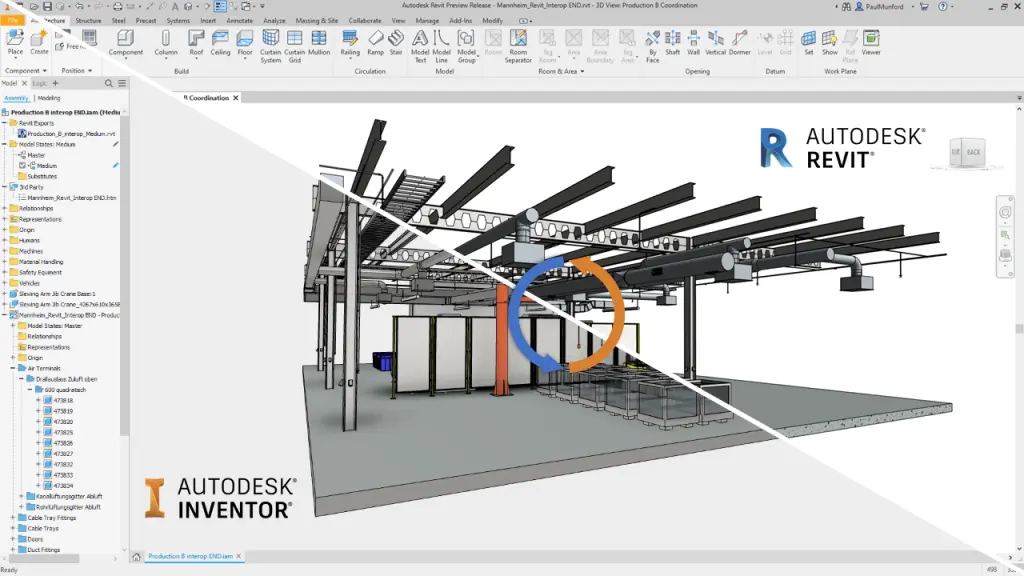
Inventor Fabrication Design Training Course
What You'll Learn in the Autodesk Inventor Fabrication Design Course
- Creating and managing advanced assemblies with constraints, top-down design workflows
- Managing and customising parts using the Inventor Content Center
- iLogic design rule automation and form driven design
- Designing sheet metal components including flanges, folds, hems, and flat patterns
- Generating structural frames using Frame Generator and standard member libraries
- Importing and working with Revit, DWG, and BIM file formats
- Referencing point cloud data from Recap for use in fabrication models
- Preparing Inventor models for clash detection and coordination in Navisworks
- Applying best practices for fabrication-ready modeling and drawing output
- Enhancing design productivity with multi-body modeling and weldments
- Exporting coordinated design data for downstream BIM and manufacturing workflows
Autodesk Inventor Fabrication Design Training Course Topics
Session 1-2 - Advanced Assembly
Build on basic skills to explore advanced assembly and file management workflows, including project data re-use, constraints, top‑down design, derived components, layout design, skeletal modelling, level of detail, shrinkwrap, and use of Design Accelerator and Bill of Materials.
Session 3 - Content Center Management
Learn to access, customise, and deploy standard parts using Inventor’s Content Center, ensure cross‑project component consistency, and enhance library effectiveness.
Session 4 - iLogic
Learn design automation techniques and form driven rules to link parameters to automate top-down design, and automatically update parameters, component and feature suppression or visibility, materials and iproperties.
Session 5-6 - Sheet Metal Design
Learn how to create manufacturable sheet metal parts using features such as flanges, contour rolls, hems, folds, rips, corner rounds, chamfers, multi‑body modelling, flat patterns, and detailed drawing documentation.
Session 7 - Frame Generator
Discover how to develop structural frames rapidly using Inventor’s Frame Generator, applying standard members and designing weldments.
Session 8 - BIM and CAD Interoperability, Point Clouds and Project Coordination
Working with Revit & DWG Files
Master methods to import/export Inventor/Revit projects and families, import/export and underlay DWG data, and collaborate efficiently between CAD and BIM environments.
Recap (Point Clouds) and Navisworks Integration
Learn how to use Autodesk Recap for point‑cloud conversion and reference in Inventor, as well as data aggregation workflows with Navisworks for model coordination and clash detection.
Who Should Attend the Autodesk Inventor Fabrication Design Course?
Inventor users who are already familiar with the fundamentals of Autodesk Inventor project, part, assembly and drawing environments.
Why Choose Design Consulting | Autodesk Gold Partner | Autodesk Service Provider
Design Consulting is a trusted Autodesk Gold Partner and Autodesk Service Provider. Design Consulting empowers architects, engineers, manufacturers, and builders with smart software, automation, and digital tools that provide Autodesk end-to-end solutions that are connected with systems and machines. As an Autodesk Gold Partner, we deliver tailored solutions that simplify workflows, reduce costs, and drive better project outcomes.
Enrol Now in the Autodesk Inventor Fabrication Design Course
Start your journey in digital fabrication design. Contact Design Consulting today to register or learn more about our Inventor training options.
Ready to Design with Precision and Speed?
Transform the way you create, visualise, simulate, and deliver designs, reports and drawings. Contact us today to explore training, services and subscription options or request a demo.
Fill out the contact form below or contact us on 1800 514 490, info@designconsulting.com.au or by live chat