



Advanced Automation for Autodesk Vault Professional
Automate Autodesk Vault Jobs, File Exports and Engineering Deliverables
JP Pro is an advanced Autodesk Vault Professional Job Processor designed to automate repetitive engineering tasks, file exports and document creation.
Built for organisations using Autodesk Vault Professional, Autodesk Inventor and AutoCAD, JP Pro extends Vault automation beyond the standard Job Processor with flexible server-based and local job processing, batch processing, automated exports, release packages and configurable engineering workflows.
Spend less time manually creating deliverables and more time designing.

Common Autodesk Vault Job Processing Challenges
Engineering teams often spend significant time performing repetitive tasks after the design work is complete.
Common challenges include:
- Manually exporting PDF, DWG, DXF and other deliverables
- Opening files individually simply to create an output
- Repetitive processing of large numbers of drawings and models
- Inconsistent file names and export locations
- Ensuring the correct revision is being issued
- Creating complete release or transmittal packages
- Manually collecting related engineering documents
- Job Processor queues delaying urgent work
- Reliance on a single dedicated Job Processor workstation
- Limited control over where jobs are processed
- Repeating multiple jobs in a particular sequence
- Moving generated files into SharePoint, OneDrive or other locations
- Engineering time being consumed by administrative processes
JP Pro automates these workflows directly around your Autodesk Vault environment.
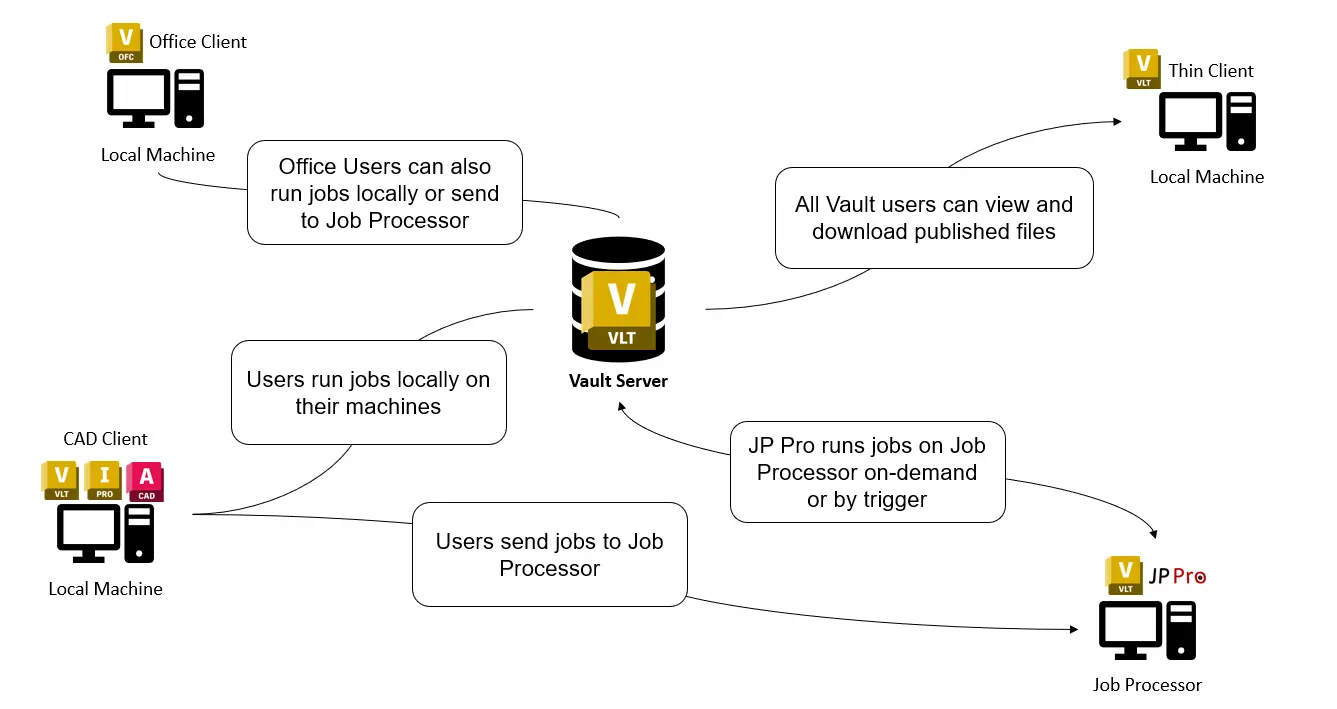
Local & Server Job Processing
JP Pro gives organisations greater control over where Autodesk Vault jobs are processed.
Server Processing
Run automated engineering jobs through dedicated Job Processor machines for centralised, unattended processing.
Ideal for scheduled, lifecycle-driven and high-volume automation.
Local Processing
Allow authorised users to process selected jobs using their own workstation.
Local processing is ideal when a user needs an output immediately without waiting for the central Job Processor queue.
Together, Local + Server Processing provide a flexible automation environment that can scale with different engineering workflows.
Automate Autodesk Inventor, AutoCAD and MS Excel and Word through Autodesk Vault

Inventor
AutoCAD

Excel

Word
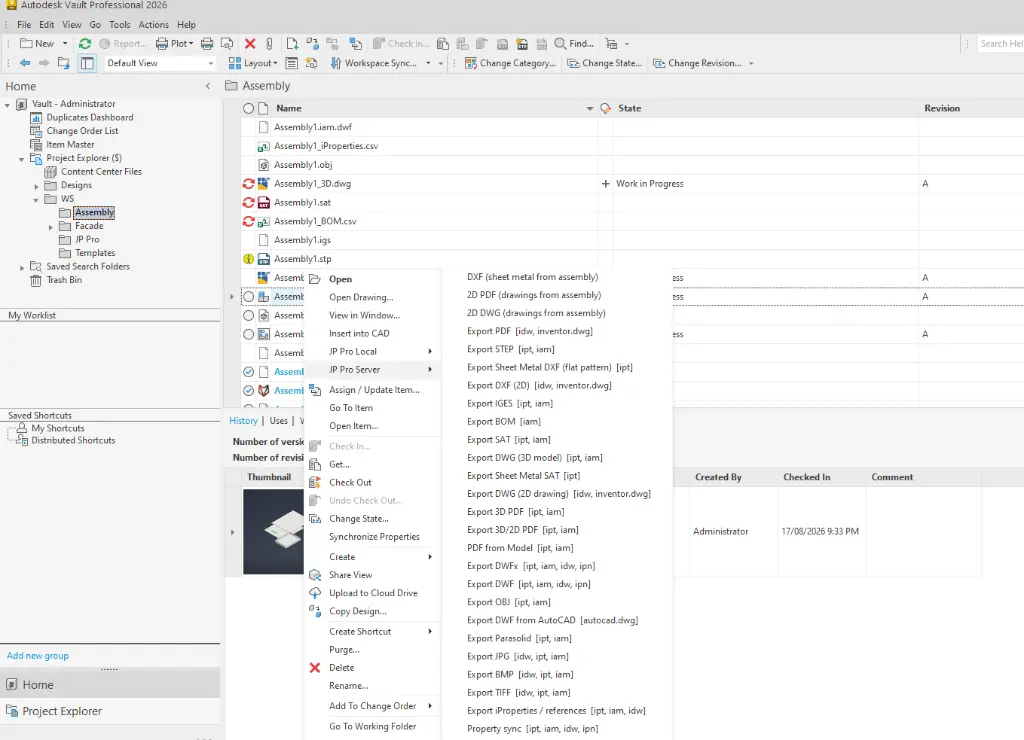
Export and Publish Files from Autodesk Inventor and AutoCAD

2D and 3D PDF

Sheet Metal DXF

DWG
STEP

IGES
BOM
Save Time and Money by Automating Vault
Automate file export publishing, email notifications and change state workflows.
|
Feature |
Vault Job Processor |
JP Pro |
|
PDF Export |
● |
● |
|
DWG Export |
● |
● |
|
STEP Export |
● |
● |
|
DXF Export |
● |
● |
|
Revision Table Update |
● |
● |
|
BOM Export |
|
● |
|
PDF Watermarking |
|
● |
|
3D DWG Export |
|
● |
|
IGES Export |
|
● |
|
SAT Export |
|
● |
|
STL Export |
|
● |
|
3D PDF Export |
|
● |
|
GLB Export |
|
● |
|
Image Export |
|
● |
|
Batch Export |
|
● |
|
On-demand Export |
|
● |
|
Email Notifications |
|
● |
|
Advanced file naming |
|
● |
|
Advanced file location |
● |
|
|
Automated File Publishing |
|
● |
|
On-Demand File Publishing |
|
● |
|
Email Notifications |
|
● |
Eliminate Manual Workflows and File Exporting in Autodesk Vault
Reduce the need for users to manually open Autodesk Inventor or AutoCAD files simply to create downstream deliverables.
Automated Engineering File Exports
Automatically generate engineering deliverables from Vault-managed files, including workflows for:
- DWG
- DXF
- STEP
- IGES
- DWF
- Image formats
- Other configurable engineering outputs
Batch Processing
Process multiple Vault files in a single operation.
Select assemblies, drawings, models or groups of files and allow JP Pro to automatically process the required jobs.
This can dramatically reduce the time required when releasing large engineering projects or generating updated deliverables.
Sequential Job Processing
Create configurable sequences containing multiple processing operations.
For example:
Update File → Generate PDF → Generate DXF → Export STEP → Package Files → Distribute Outputs
JP Pro can execute the complete sequence automatically, helping standardise engineering release procedures.
Release Packages & Transmittals
Automate the creation of complete engineering release packages.
Create:
- Manufacturing release packages
- Supplier packages
- Customer deliverables
- Project transmittals
- Drawing packages
- ZIP archives
- Structured output folders
Autodesk Vault Lifecycle Automation
Trigger processing as part of your existing Autodesk Vault lifecycle and change-state workflows.
When engineering data reaches a defined lifecycle state, JP Pro can automatically perform the required downstream processing.
This helps turn Vault lifecycle management into an active automation system rather than simply a document approval process.
Automate Naming & Folder Structures
Standardise how generated engineering documents are named and stored.
JP Pro can automate:
- Output filenames
- Revision information
- Folder structures
- Project folders
- Release directories
- Export locations
JP Pro Benefits
Save Engineering Time
Remove repetitive exporting, packaging and document-processing tasks from engineers and designers.
Reduce Manual Errors
Automated processes help ensure the correct files, revisions, formats and locations are consistently used.
Faster Engineering Releases
Generate complete sets of manufacturing or customer deliverables automatically instead of manually processing files individually.
Standardise Your Processes
Create repeatable workflows so engineering outputs are generated consistently regardless of who initiates the process.
Reduce Job Processor Bottlenecks
Combine centralised server processing with local workstation processing when users require immediate results.
Improve Autodesk Vault ROI
Extend Autodesk Vault Professional beyond document management by using it as the foundation for automated engineering workflows.
Why JP Pro?
JP Pro is designed specifically around the workflows of engineering organisations using Autodesk technology.
Instead of changing the way your engineering team works, JP Pro extends your existing Autodesk Vault Professional, Inventor and AutoCAD environment with additional automation.
Less manual processing. Faster releases. Consistent engineering deliverables.
Take Autodesk Vault Automation Further
Turn repetitive engineering processes into automated workflows with JP Pro.
Whether you need automated file exports, batch processing, local processing, server automation or complete engineering release packages, JP Pro helps you get more from Autodesk Vault Professional.
Ready to Design with Precision and Speed?
Transform the way you create, visualise, simulate, and deliver designs, reports and drawings. Contact us today to explore training, services and subscription options or request a demo.
Fill out the contact form below or contact us on 1800 514 490, info@designconsulting.com.au or by live chat