Autodesk Machining Solutions
CAM, CNC Sheet Metal and Fabrication Solutions
Autodesk provides a complete ecosystem of advanced machining software and solutions designed to streamline CNC programming, optimize manufacturing workflows, and deliver superior part quality. From integrated CAD/CAM systems to specialized tools for complex 5-axis machining, our products empower manufacturers to increase efficiency and reduce production costs.
Leverage the power of the Product Design & Manufacturing Collection with Inventor CAM and Inventor Nesting, alongside industry-leading solutions including Fusion with Manufacturing Extensions, FeatureCAM, PowerInspect, Netfabb, CAMplete, and extend capabilities into construction with Advance Steel and CAMduct.
Design Consulting is an Autodesk Gold Partner and Service Provider, offering Autodesk Software with wide range of complimentary software, training courses and services for Autodesks Ecosystem.
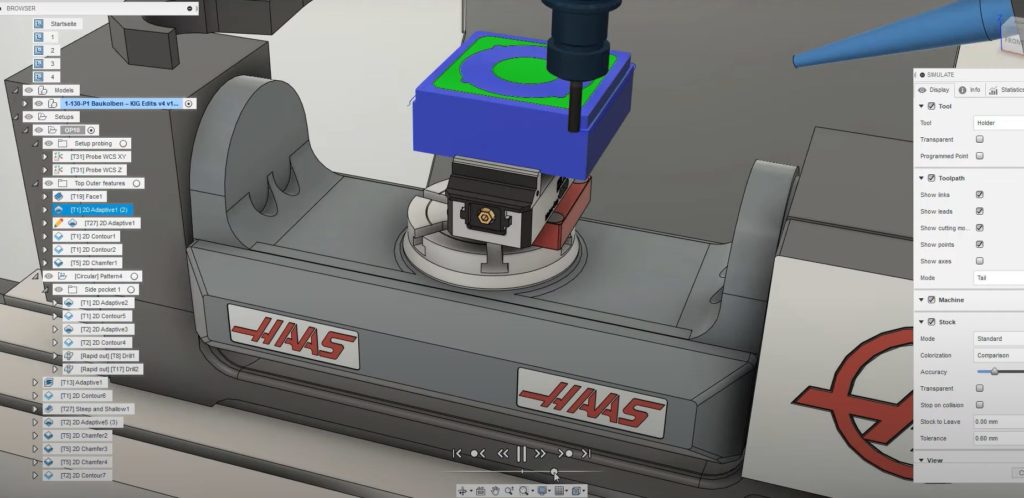
Autodesk Machining Ecosystem
Autodesk offers a complete ecosystem of advanced machining software and solutions designed to streamline the entire manufacturing process from design to production. Our integrated tools support CNC programming, toolpath optimization, nesting, simulation, and quality inspection, enabling manufacturers to achieve higher efficiency, precision, and productivity.
The Product Design & Manufacturing Collection provides seamless access to Inventor CAM and Inventor Nesting, delivering powerful 2.5 to 5-axis machining capabilities directly within the Inventor environment. These tools help engineers and machinists generate optimized toolpaths, reduce material waste, and accelerate time to market.
Complementing these core solutions are industry-leading products including Fusion with its manufacturing extensions, FeatureCAM for automated CAM programming, PowerInspect for metrology and quality control, Netfabb for additive manufacturing and design optimization, CAMplete for post-processing and simulation, and specialized solutions such as Advance Steel and Fabrication Suite (CAMduct) for stru
Our Design Consulting CNC services bring together expert knowledge and Autodesk technology to help organizations implement best-practice workflows, optimize existing processes, and maximize the value of their machining investments. Whether you require support for complex 5-axis machining, automation strategies, or digital manufacturing transformation, our professional consultants deliver tailored

Autodesk Product Design and Manufacturing Collection
Organise and secure your AutoCAD and Inventor files with Vault Basic. Manage version history, prevent data loss, and streamline collaboration within your local network.
Autodesk Fusion
Take control of your engineering data by automating workflows, manage complex assemblies, and connect teams across locations with advanced search and lifecycle tools.

Autodesk Advance Steel 2027
Cutting-edge software designed for structural detailing and fabrication
![Autodesk Inventor 2027 - Advanced Engineering Solutions for 3D Design** Image [18] Image [19] Image [20] Image [21] Autodesk](/web/image/14035)
Autodesk Inventor 2027
Powerful 3D Mechancial CAD Tools for Steel Fabrication and Sheet Metal Design
![Autodesk Fabrication CAMduct 2027 – Advanced Sheet Metal Fabrication** Autodesk%20Fabrication%20CAMduct%202027%208 [18]](/web/image/13765)
Autodesk Fabrication CAMduct 2027
Advanced Job Processor for Autodesk Vault Professional to automate file publishing, BOM's, email notifications and more.
Autodesk Fusion Machining Ecosystem
Autodesk offers a complete ecosystem of machining solutions designed to streamline the transition from design to production. Our integrated software tools support the full spectrum of manufacturing processes, from 2.5-axis to 5-axis CNC machining, enabling precision, efficiency, and innovation across industries.
The Product Design & Manufacturing Collection provides powerful capabilities through Inventor CAM and Inventor Nesting, delivering seamless integration between design and manufacturing workflows. These tools help manufacturers reduce errors, optimize material usage, and accelerate time to market.
Advanced solutions including Fusion with its manufacturing extensions, FeatureCAM, CAMplete, PowerInspect, and Netfabb address complex machining requirements. Whether you need multi-axis milling, turning, wire EDM, or additive manufacturing preparation, our portfolio delivers industry-leading performance.
Complementing our software offerings, we provide expert Design Consulting CNC services. Our experienced consultants work directly with your team to optimize machining strategies, implement best practices, and maximize the value of your Autodesk investments. From process improvement to custom automation, we help transform your manufacturing operations.
Fusion
Powerful toolpaths, adaptive clearing, 2.5-5-axis machining, stock simulation & custom posts. Seamless design-to-manufacture workflow for precision CNC parts from a single cloud platform.
![Autodesk Fusion with CAMplete – CNC Post-Processing & Simulation** Image [18] Image [19] Image [20] Image [21] Autodesk](/web/image/41655)
CAMplete TurnMill
G-code post-processing, verification and simulation for Nakamura-Tome multi-tasking machines. Combine CAM outputs, detect collisions, sync turrets/spindles and optimize cycle times in 3D.
![Autodesk Fusion with CAMplete – CNC Post-Processing & Simulation** Image [18] Image [19] Image [20] Image [21] Autodesk](/web/image/41656)
CAMplete TurnPath
Customizable post-processing, G-code verification and full 3D simulation for 3- to 5-axis milling machines. Import CAM data, detect collisions and overtravel for safe, efficient NC codes.

PowerInspect
3D inspection for complex free-form shapes. Supports CMMs, portable arms, scanners and on-machine probing. CAD-based measurement, collision checks & automated reports for quality control.
![Autodesk Powermill – Advanced CNC Programming for Complex Manufacturing** Image [18] Image [19] Image [20] Image [21]](/web/image/14124)
PowerMill
Advanced CAM for complex 3- and 5-axis machining. High-efficiency roughing, comprehensive finishing, toolpath optimization and full machine simulation for molds, dies and precision parts.
![Autodesk Fusion with PowerShape - Advanced Modelling Software for Manufacturing** Image [18]](/web/image/14136)
PowerShape
Manufacturing CAD that combines surfaces, solids and meshes. Import, repair and prepare complex models for CNC. Ideal companion for PowerMill with electrodes, core-cavity and mold design.
![Autodesk Fusion with Netfabb – Advanced 3D Printing and Modelling** Autodesk%20Fusion%20with%20Netfabb%205 [17] Image [18]](/web/image/27934)
Netfabb
Prepare, repair and optimise 3D models for additive manufacturing with advanced build preparation, simulation, lattice tools and automated workflows for reliable production.
![Autodesk Fusion for Manufacturing – Advanced Product Design and Manufacturing Solution** Image [18] Image [19] Image [20]](/web/image/13815)
Fusion for Manufacturing
Connect design, engineering and manufacturing in one platform with integrated CAD, CAM and CNC tools for machining, fabrication and streamlined production workflows.
![Autodesk Fusion with FeatureCAM – CNC Solutions For Automated Machining** Autodesk%20Fusion%20with%20FeatureCAM%205 [18]](/web/image/13874)
FeatureCAM
Automate CNC programming for mills, lathes, turn-mill and wire EDM with feature recognition, intelligent toolpaths and manufacturing automation for faster, consistent machining.
Compare Autodesk Machining Products
Below is a technical capability matrix between Autodesks Machining Solutions
Legend: ✓ = native/core capability · ◐ = limited/specialised/indirect · — = not intended for this function.
| Technical capability / tool | PDMC | CAMduct | Advance Steel | CAMplete TurnMill | CAMplete TruePath | PowerInspect | PowerMill | PowerShape |
|---|---|---|---|---|---|---|---|---|
| Core CAD / Geometry | ||||||||
| Parametric 3D solid modelling | ✓ Inventor + Fusion | — | ◐ Structural objects | — | — | — | — | ✓ |
| Direct modelling | ✓ | — | ◐ | — | — | — | — | ✓ |
| Surface modelling | ✓ Inventor/Fusion | — | — | — | — | — | CAM-oriented | ✓ Advanced |
| Sheet-metal design | ✓ Inventor/Fusion | ✓ HVAC-specific | ✓ Plates | — | — | — | — | ✓ |
| Assemblies | ✓ Inventor | — | ✓ Structural assemblies | — | — | — | — | ◐ |
| Mesh modelling/editing | ✓ Fusion | — | — | — | — | Inspection meshes | Input geometry | ✓ |
| CAD repair / healing | ✓ | — | — | — | — | Alignment | ◐ | ✓ Specialist |
| Reverse engineering | ✓ | — | — | — | — | Measurement | — | ✓ Advanced |
| Point-cloud workflows | ✓ | — | ✓ reference data | — | — | ✓ | — | ✓ |
| 2D / 3D Milling | ||||||||
| 2D milling | ✓ | — | — | Verify | Verify | — | ✓ | — |
| 2.5D milling | ✓ | — | — | Verify | Verify | — | ✓ | — |
| 3-axis milling | ✓ | — | — | Verify | Verify | — | ✓ | — |
| 3+2 positional | ✓ | — | — | Verify | ✓ Verify | — | ✓ | — |
| 4-axis simultaneous | ✓ | — | — | Verify | ✓ | — | ✓ | — |
| 5-axis simultaneous | ✓ Fusion/Inventor CAM | — | — | Verify | ✓ | — | ✓ Advanced | — |
| Face milling | ✓ | — | — | Verify | Verify | — | ✓ | — |
| Pocket machining | ✓ | — | — | Verify | Verify | — | ✓ | — |
| 2D contour | ✓ | — | — | Verify | Verify | — | ✓ | — |
| Slot machining | ✓ | — | — | Verify | Verify | — | ✓ | — |
| Bore machining | ✓ | — | — | Verify | Verify | — | ✓ | — |
| Drilling | ✓ | — | Fabrication holes | Verify | Verify | — | ✓ | — |
| Tapping | ✓ | — | — | Verify | Verify | — | ✓ | — |
| Hole recognition | ✓ | — | ✓ Structural holes | — | — | Measurement | ✓ | — |
| Adaptive clearing | ✓ 2D/3D | — | — | Verify | Verify | — | ✓ | — |
| Rest machining | ✓ | — | — | Verify | Verify | — | ✓ Advanced | — |
| Parallel finishing | ✓ | — | — | Verify | Verify | — | ✓ | — |
| Scallop finishing | ✓ | — | — | Verify | Verify | — | ✓ | — |
| Steep & Shallow | ✓ Fusion | — | — | Verify | Verify | — | ✓ | — |
| Flat-area finishing | ✓ | — | — | Verify | Verify | — | ✓ | — |
| Swarf machining | ✓ | — | — | Verify | ✓ | — | ✓ | — |
| Multi-axis contour | ✓ | — | — | Verify | ✓ | — | ✓ | — |
| Tool-axis tilt control | ✓ | — | — | Analyse | ✓ | — | ✓ Advanced | — |
| Automatic collision avoidance | ✓ | — | — | Detect | Detect | — | ✓ Advanced | — |
| Local tool-axis editing | ◐ | — | — | — | ◐ | — | ✓ | — |
| Dynamic machine positioning | ◐ | — | — | Analysis | ✓ | — | ✓ Dynamic Machine Control | — |
| Turning / Mill-Turn | ||||||||
| Turning – facing | ✓ | — | — | ✓ Verify | — | — | — | — |
| Turning – profiling | ✓ | — | — | ✓ Verify | — | — | — | — |
| Turning – grooving | ✓ | — | — | ✓ Verify | — | — | — | — |
| Turning – boring | ✓ | — | — | ✓ Verify | — | — | — | — |
| Turning – threading | ✓ | — | — | ✓ Verify | — | — | — | — |
| Live-tool milling | ✓ | — | — | ✓ Verify | — | — | — | — |
| Mill-turn | ✓ | — | — | ✓ Specialist | — | — | — | — |
| Main/sub-spindle | ✓ Machine dependent | — | — | ✓ | — | — | — | — |
| Multiple turrets | ✓ Machine dependent | — | — | ✓ | — | — | — | — |
| Turret synchronisation | ◐ | — | — | ✓ Specialist | — | — | — | — |
| Part transfer | ✓ Machine dependent | — | — | ✓ | — | — | — | — |
| Time-based operation optimisation | ◐ | — | — | ✓ | — | — | — | — |
| Nakamura-Tome optimisation | — | — | — | ✓ Dedicated | — | — | — | — |
| Cutting / Nesting | ||||||||
| 2D profile cutting | ✓ | ✓ | — | — | — | — | — | — |
| Laser | ✓ | ✓ Machine dependent | — | — | — | — | — | — |
| Plasma | ✓ | ✓ | — | — | — | — | — | — |
| Waterjet | ✓ | ✓ | — | — | — | — | — | — |
| Associative nesting | ✓ Inventor Nesting + Fusion | ✓ | — | — | — | — | — | ◐ |
| Multi-sheet nesting | ✓ | ✓ | — | — | — | — | — | ◐ |
| True-shape nesting | ✓ | ✓ | — | — | — | — | — | ◐ |
| Material/thickness nesting rules | ✓ | ✓ | — | — | — | — | — | ◐ |
| Remnant utilisation | ✓ | ✓ | — | — | — | — | — | ◐ |
| Nesting reports | ✓ | ✓ | — | — | — | — | — | — |
| HVAC Fabrication | ||||||||
| Parametric HVAC fittings | — | ✓ Specialist | — | — | — | — | — | — |
| Rectangular duct | — | ✓ | — | — | — | — | — | — |
| Round duct | — | ✓ | — | — | — | — | — | — |
| Duct developments | — | ✓ | — | — | — | — | — | — |
| HVAC fabrication database | — | ✓ | — | — | — | — | — | — |
| Duct-specific nesting | — | ✓ | — | — | — | — | — | — |
| Fabrication labels | — | ✓ | — | — | — | — | — | — |
| Barcode / QR workflows | — | ✓ | — | — | — | — | — | — |
| Structural Steel | ||||||||
| Structural steel modelling | ✓ Generic | — | ✓ Specialist | — | — | — | — | — |
| Beams / columns | ✓ Generic | — | ✓ Intelligent | — | — | — | — | — |
| Plates | ✓ | — | ✓ Intelligent | — | — | — | — | ✓ Geometry |
| Bolts / anchors | ✓ Generic | — | ✓ Specialist | — | — | — | — | — |
| Steel connections | — | — | ✓ | — | — | — | — | — |
| Connection library | — | — | ✓ | — | — | — | — | — |
| Connection propagation | — | — | ✓ | — | — | — | — | — |
| Connection checking | — | — | ✓ | — | — | — | — | — |
| Shop drawings | ✓ General drawings | — | ✓ Automated | — | — | — | — | — |
| GA drawings | ✓ | — | ✓ | — | — | — | — | — |
| Structural BOMs | ✓ Generic BOM | — | ✓ | — | — | — | — | — |
| DSTV/NC output | — | — | ✓ | — | — | — | — | — |
| Simulation / Verification | ||||||||
| Toolpath simulation | ✓ | — | — | ✓ | ✓ | — | ✓ | — |
| Stock-removal simulation | ✓ | — | — | ✓ | ✓ | — | ✓ | — |
| Remaining-stock analysis | ✓ | — | — | ✓ | ✓ | — | ✓ Advanced | — |
| Full machine simulation | ✓ | — | — | ✓ | ✓ | CNC/CMM | ✓ | — |
| Tool collision checking | ✓ | — | — | ✓ | ✓ | Probe | ✓ | — |
| Holder collision checking | ✓ | — | — | ✓ | ✓ | Probe | ✓ | — |
| Machine collision detection | ✓ | — | — | ✓ | ✓ | ✓ | ✓ | — |
| Axis limit/overtravel checking | ✓ | — | — | ✓ | ✓ | — | ✓ | — |
| Rotary-axis analysis | ✓ | — | — | ✓ | ✓ | — | ✓ | — |
| G-code verification | ✓ Machine simulation | — | — | ✓ Specialist | ✓ Specialist | — | ✓ | — |
| CL-data verification | — | — | — | ✓ | ✓ | — | ◐ | — |
| G-code comparison | — | — | — | ◐ | ✓ | — | — | — |
| Machine-specific digital twin | ✓ Machine definitions | — | — | ✓ Nakamura-Tome | ✓ | CMM/CNC | ✓ | — |
| Inspection / Metrology | ||||||||
| CNC probing | ✓ | — | — | Verify | Verify | ✓ | ✓ | — |
| Part setup probing | ✓ | — | — | — | — | ✓ | ✓ | — |
| In-process inspection | ✓ Fusion | — | — | — | — | ✓ | ✓ | — |
| Surface inspection | ✓ Fusion | — | — | — | — | ✓ Specialist | ✓ Probe | — |
| CMM programming | — | — | — | — | — | ✓ | — | — |
| DCC CMM | — | — | — | — | — | ✓ | — | — |
| Manual CMM | — | — | — | — | — | ✓ | — | — |
| Portable arm measurement | — | — | — | — | — | ✓ | — | — |
| CAD-to-measured comparison | ✓ Fusion inspection | — | — | — | — | ✓ | — | ✓ Geometry comparison |
| Inspection reports | ✓ | — | — | — | — | ✓ Specialist | ✓ | — |
| Probe/rack management | ✓ | — | — | — | — | ✓ | ✓ | — |
| Electrode inspection | — | — | — | — | — | ✓ | Integration | ✓ Integration |
| Mould / Die / Electrode | ||||||||
| Mould design | ✓ Inventor Tooling | — | — | — | — | Inspect | Machine | ✓ |
| Core/cavity splitting | ✓ | — | — | — | — | — | — | ✓ Specialist |
| Parting surfaces | ✓ | — | — | — | — | — | — | ✓ |
| Shut-off surfaces | ✓ | — | — | — | — | — | — | ✓ |
| Mould-base libraries | ✓ | — | — | — | — | — | — | ✓ |
| Electrode design | ◐ | — | — | — | — | Inspect | Machine | ✓ Specialist |
| Electrode wizard | — | — | — | — | — | — | Integration | ✓ |
| Spark-gap offsets | — | — | — | — | — | Measure | Machine | ✓ |
| Multi-impression electrodes | — | — | — | — | — | Inspect | Machine | ✓ |
| Vector-burning electrodes | — | — | — | — | — | Inspect | Machine | ✓ |
| Rib capping | — | — | — | — | — | — | ✓ Machine | ✓ |
| Press-die/addendum surfaces | — | — | — | — | — | — | Machine | ✓ |
| Additive Manufacturing | ||||||||
| FFF/FDM preparation | ✓ Fusion | — | — | — | — | — | ◐ | Geometry prep |
| Metal additive preparation | ✓ Fusion | — | — | — | — | — | ◐ | Geometry prep |
| Automatic print orientation | ✓ Fusion | — | — | — | — | — | — | — |
| Support generation | ✓ Fusion | — | — | — | — | — | — | — |
| Lattice generation | ✓ Fusion | — | — | — | — | — | — | ◐ |
| Additive process simulation | ✓ Fusion | — | — | — | — | — | ◐ | — |
| DED toolpaths | ✓ Fusion | — | — | — | — | — | ✓ | Geometry prep |
| Hybrid additive/subtractive | ✓ | — | — | — | — | — | ✓ Specialist | Geometry prep |
| Specialised Manufacturing | ||||||||
| Blade machining | Generic 5-axis | — | — | Verify | Verify | Inspect | ✓ Dedicated | Geometry prep |
| Blisk machining | Generic 5-axis | — | — | Verify | Verify | Inspect | ✓ Dedicated | Geometry prep |
| Impeller machining | Generic 5-axis | — | — | Verify | Verify | Inspect | ✓ Dedicated | Geometry prep |
| Engine-port machining | Generic multi-axis | — | — | Verify | Verify | Inspect | ✓ Dedicated | Geometry prep |
| Manifold machining | Generic multi-axis | — | — | Verify | Verify | Inspect | ✓ Dedicated | Geometry prep |
| Deep-rib machining | Generic | — | — | Verify | Verify | Inspect | ✓ Specialist | ✓ Preparation |
| Industrial robot programming | ◐ Fusion workflows | — | — | — | — | — | ✓ | — |
| Robot collision simulation | ◐ | — | — | — | — | — | ✓ | — |
| Robot singularity analysis | — | — | — | — | — | — | ✓ | — |
| Automation / Output | ||||||||
| CAM templates | ✓ | — | — | Config | Config | Inspection templates | ✓ | — |
| CAM macros / automation | ✓ Fusion API | Database automation | Drawing automation | ✓ | ✓ | ✓ | ✓ Extensive | ✓ |
| Editable post processors | ✓ | Machine output | NC output | ✓ | ✓ | Machine drivers | ✓ | — |
| API / scripting | ✓ Inventor API + Fusion API | Database/API workflows | API | Configuration | Configuration | Automation | ✓ Extensive | ✓ |
| Cloud collaboration | ✓ Fusion | — | Autodesk workflows | — | — | — | — | — |
| PDM integration | ✓ Vault + Fusion Manage workflows | — | Autodesk ecosystem | — | — | — | Vault/workflows | Vault/workflows |
PDMC (Product Design & Manufacturing Collection) provides the broadest end-to-end capability, combining Inventor, Inventor CAM, Inventor Nesting and Fusion for mechanical design, assemblies, sheet metal, nesting, 2D through 5-axis machining, turning, mill-turn, additive manufacturing, simulation and inspection. Its key advantage is breadth and an integrated design-to-manufacturing workflow; its limitation is that highly specialised machining, metrology, fabrication and manufacturing-geometry workflows are deeper in dedicated products such as PowerMill, PowerInspect and PowerShape.
CAMduct is purpose-built for HVAC fabrication, providing parametric duct and fitting development, fabrication databases, material-specific nesting, cutting-machine output, labelling and production workflows. Its strength is its depth in sheet-metal HVAC manufacturing rather than general CAD/CAM. Consequently, it is highly specialised and does not provide the mechanical design, CNC machining, advanced surface modelling or general manufacturing capabilities found in PDMC and the Power products.
Advance Steel specialises in structural steel modelling, detailing and fabrication, including intelligent beams, columns and plates, steel connections, connection propagation, fabrication drawings, BOMs and NC/DSTV output. It is considerably stronger than general-purpose CAD for steel detailing and construction documentation, but it is not a machining CAM platform and offers little capability for CNC milling, turning, inspection or complex manufacturing geometry.
CAMplete TurnMill is a specialist post-processing, simulation and verification solution designed particularly for Nakamura-Tome multi-tasking machines. Its strengths are accurate machine simulation, multi-turret and multi-spindle coordination, part transfers, collision detection and synchronisation of complex mill-turn operations. It complements rather than replaces CAM software: toolpaths are generally created upstream, while TurnMill concentrates on proving, optimising and safely executing those programs on the actual machine configuration.
CAMplete TruePath specialises in translating CAM output into verified, machine-ready NC programs. It provides machine-specific post-processing, digital-twin simulation, collision and overtravel detection, rotary-axis analysis, stock comparison and G-code verification. Its major advantage is confidence that posted NC code will behave correctly on the machine; however, it is primarily a verification and post-processing environment rather than a CAD system or primary toolpath-generation platform.
PowerInspect is the strongest dedicated metrology product in the group, supporting CMMs, CNC machine-tool probing, portable measurement devices, complex surface inspection, CAD-to-measured comparison and detailed inspection reporting. Its advantage is the depth and flexibility of inspection programming across different measurement hardware. Its limitation is equally clear: it is designed to measure and validate manufactured components rather than design them or generate their primary machining toolpaths.
PowerMill is the specialist high-end machining solution, particularly for complex 3-axis and simultaneous 5-axis work. It provides extensive tool-axis control, collision avoidance, advanced finishing and rest-machining strategies, Dynamic Machine Control and dedicated workflows for blades, blisks, impellers, ports, manifolds, deep ribs, industrial robots and hybrid/DED manufacturing. It provides substantially greater control than general-purpose CAM when machining very complex components, but that additional depth also makes it more specialised than PDMC for organisations primarily performing conventional machining.
PowerShape is focused on preparing difficult geometry for manufacturing. It combines solid, surface and mesh modelling with model repair, reverse engineering, mould and die preparation, core/cavity splitting, rib management and highly developed EDM electrode-design workflows. Its major advantage is its ability to repair, modify and manufacture geometry that can be problematic in conventional CAD systems. Its limitation is that it is principally a manufacturing-modelling tool and normally works alongside PowerMill, PowerInspect or other CAM systems rather than replacing them.
Overall, PDMC provides the broadest general-purpose design-to-manufacturing platform, while the other applications add specialist depth. CAMduct addresses HVAC fabrication, Advance Steel structural steel construction and fabrication, CAMplete machine-level NC verification, PowerInspect metrology, PowerMill advanced CNC machining, and PowerShape complex manufacturing geometry, mould/die and electrode preparation. The products therefore overlap in selected areas but are primarily complementary rather than direct substitutes.
Complimentary Software and Services for Autodesk Software
Autodesk offers a complete ecosystem of machining solutions designed to streamline the transition from design to manufacturing. Our integrated software tools support CNC programming, toolpath generation, nesting, simulation, and inspection across a wide range of manufacturing processes.
The Product Design & Manufacturing Collection includes powerful applications such as Inventor CAM and Inventor Nesting, providing seamless CAD/CAM integration for efficient part programming and material optimization. These tools enable manufacturers to reduce errors, minimize waste, and accelerate production cycles.
For advanced fabrication and steel detailing, Autodesk Advance Steel and Fabrication Suite (CAMduct) deliver specialized capabilities for structural engineering and ductwork manufacturing. Complementing these are industry-leading solutions including Fusion with its manufacturing extensions, PowerInspect for metrology, Netfabb for additive manufacturing, CAMplete for post-processing, and FeatureCAM
Our Design Consulting CNC services bring together expert knowledge and Autodesk technology to help organizations optimize their machining workflows, implement best practices, and achieve higher productivity. Whether you require support for 2.5-axis milling, multi-axis machining, or complex mill-turn operations, our professionals deliver tailored strategies that align with your specific production
Why Choose Design Consulting | Autodesk Gold Partner | Autodesk Service Provider
Design Consulting is a trusted Autodesk Gold Partner and Autodesk Service Provider. Design Consulting empowers architects, engineers, manufacturers, and builders with smart software, systems, automation, and digital tools that provide Autodesk end-to-end solutions that are connected with systems and machines. As an Autodesk Gold Partner, we deliver tailored solutions that simplify workflows, reduce costs, and drive better project outcomes.
About DC Autodesk Courses Services Configurators CRM/ERP Batch Imagery
Ready to Fabricate?
Speak with our team today to see how Autodesk tools can help you manage your project data from concept to completion.
Fill out the contact form below or contact us on 1800 490 514, info@designconsulting.com.au or by live chat