Powerful PDF Tools for Construction and Design
Build Better. Work Smarter. Collaborate Anywhere.
Bluebeam PDF software delivers industry-leading tools for creating, editing, marking up, and collaborating on PDFs. Trusted by architects, engineers, and construction professionals worldwide, Bluebeam streamlines document workflows and improves project efficiency.
From basic PDF viewing to advanced automation and cloud collaboration, Bluebeam offers tailored solutions for every stage of the project lifecycle.
Design Consulting is an Autodesk Gold Partner and Service Provider, offering Autodesk Software with wide range of complimentary software, training courses and services for Autodesks Ecosystem.
Bluebeam PDF Software
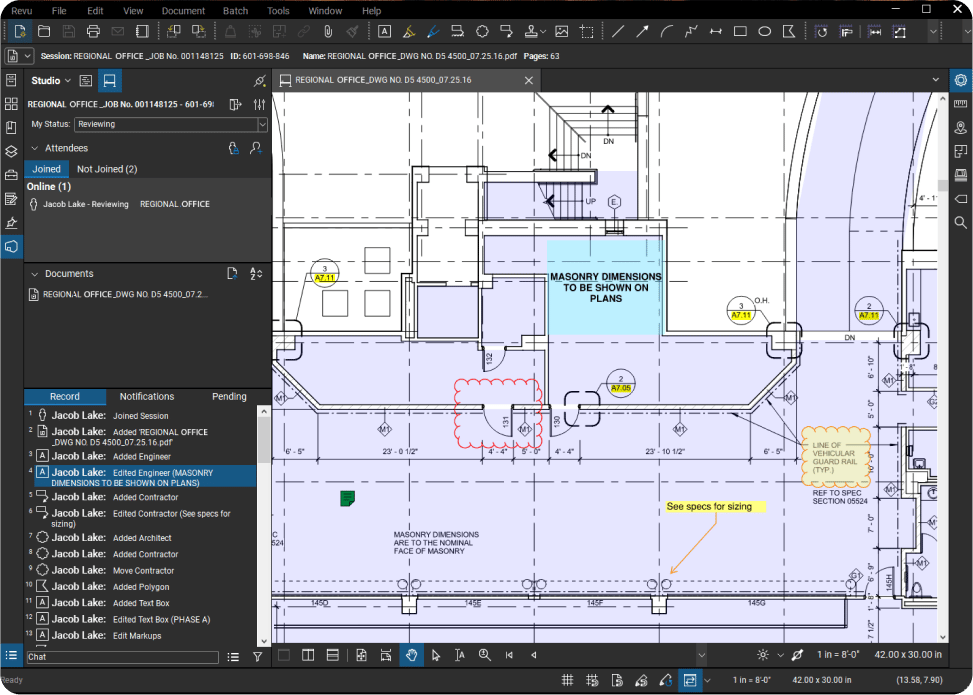
Bluebeam develops powerful PDF creation, markup, and collaboration software trusted by architecture, engineering, and construction professionals worldwide. Its flagship product, Bluebeam Revu, streamlines document workflows, improves accuracy, and accelerates project delivery from design through to handover.
With intelligent markup tools, real-time collaboration features, and industry-specific capabilities, Bluebeam helps teams reduce errors, save time, and maintain version control across complex projects.

Bluebeam Basics
Essential PDF tools for viewing, editing, marking up and measuring drawings. Ideal for professionals who need reliable document review and straightforward project collaboration.

Bluebeam Core
Advanced PDF markup, measurement and collaboration tools for AEC professionals, with drawing overlays, Studio management, custom workflows and powerful document review tools.

Bluebeam Complete
Advanced estimating, takeoff and automation tools with Dynamic Fill, Quantity Link, Batch Link and reporting, built for professionals managing complex construction documentation.
Bluebeam Max
Bluebeam’s most advanced solution, combining Complete with AI-powered Smart Review, Smart Overlay, Magic Markups, Stitching and connected workflows for high-performing AEC teams.
Bluebeam Features
Bluebeam provides purpose-built PDF, drawing management, measurement and collaboration tools for architecture, engineering and construction professionals. From initial design reviews and quantity takeoffs through construction, site coordination and project handover, Bluebeam helps teams manage project information digitally and keep office and field teams connected.
All Bluebeam subscription plans include access to Bluebeam Revu for Windows desktop, Bluebeam on web and mobile, technical support and secure centralised storage.
PDF Markup and Drawing Review
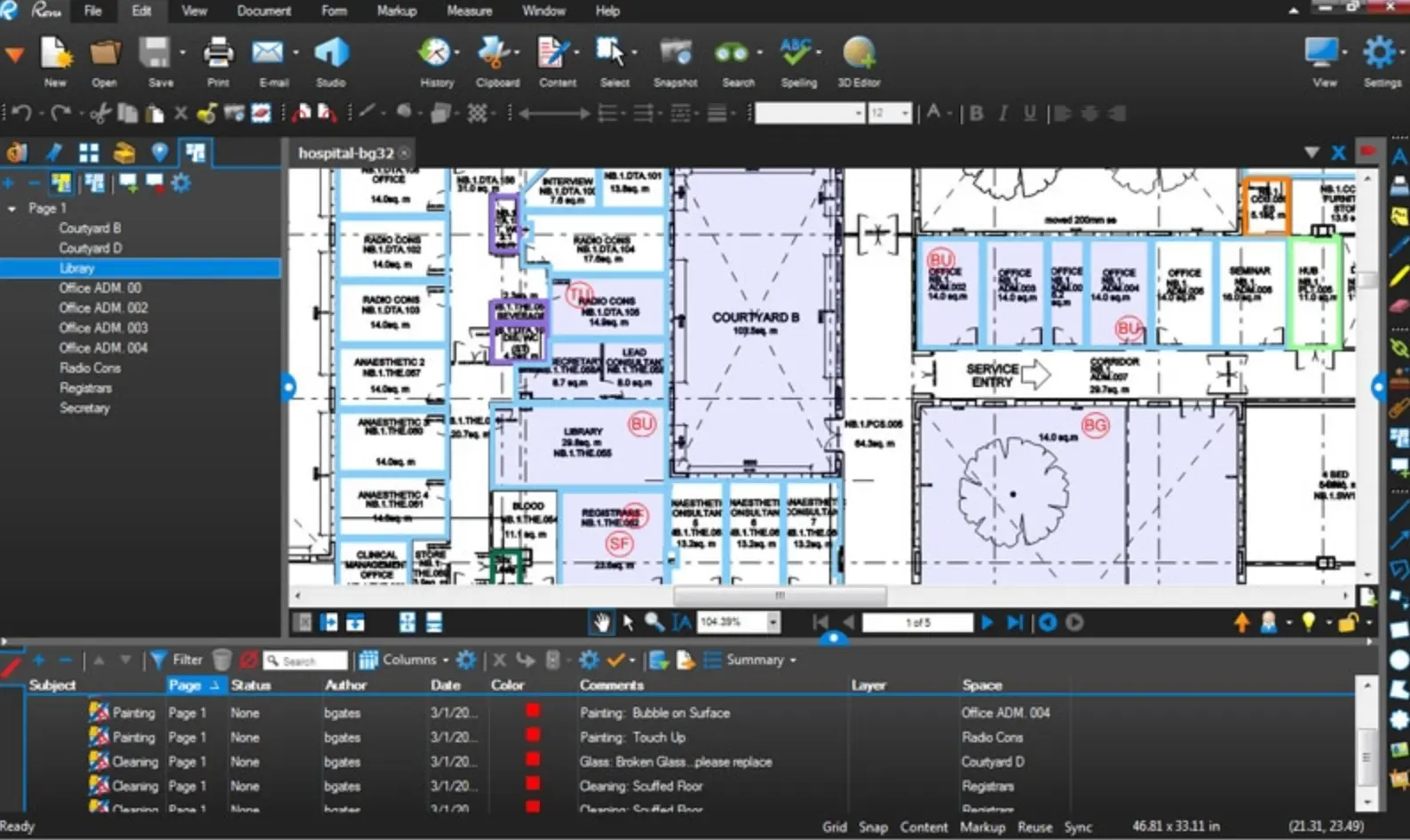
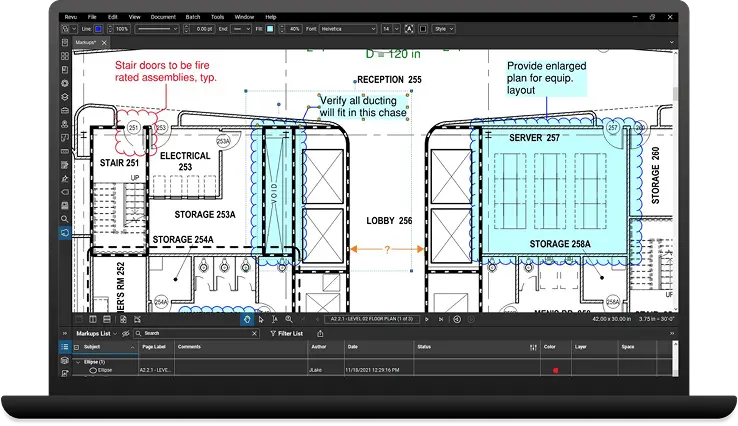
Create detailed markups directly on PDF drawings using text, callouts, clouds, shapes, stamps, highlights, lines and other industry-focused annotation tools.
Use the Markups List to organise, filter, sort and manage comments and annotations, providing a structured record of drawing reviews and project communication.
Measurements and Quantity Takeoffs
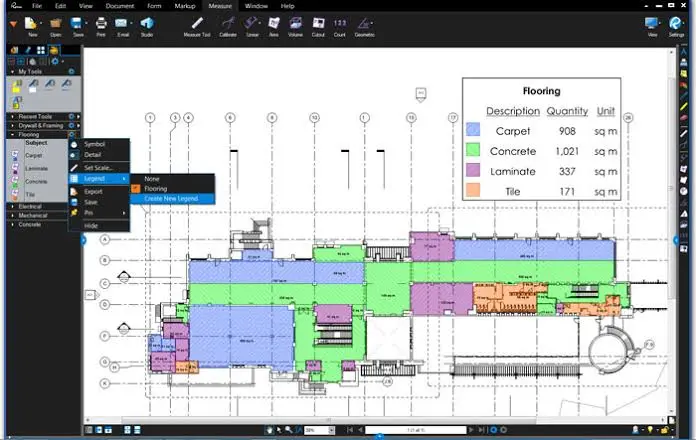
Measure directly from PDF drawings using calibrated measurement tools.
Depending on your Bluebeam plan, measurement capabilities include:
- Length, Area, Perimeter and Polylength
- Count and Angle
- Volume
- Multiple drawing scales
- Custom measurement formulas
- Dynamic Fill
- Quantity Link with Microsoft Excel
Tool Chest
Save frequently used markups and measurement tools to the Tool Chest for fast reuse across projects.
Create customised Tool Sets for different disciplines, projects or organisations to standardise symbols, markup properties and measurement workflows across your team.
Drawing Comparison and Overlays
Quickly identify changes between drawing revisions rather than manually checking sheets.
Overlay drawings using different colours to visually identify differences, or use document comparison tools to locate revisions and changes between drawing sets.
Core, Complete and Max provide increasingly powerful drawing comparison and automation capabilities, with Max adding AI-powered Smart Overlay.
Document Management
Create, edit, combine and organise PDF project documentation from within Bluebeam.
Manage pages, bookmarks, hyperlinks, attachments, drawing sets and other document information to create structured digital drawing packages.
Advanced plans provide automation capabilities including Batch Link, Batch Slip Sheet and batch processing for large drawing sets.
Bluebeam Studio Collaboration
Connect project stakeholders through Bluebeam Studio and collaborate on drawings and project documentation.
Teams can review drawings, communicate using markups and access project files from desktop, web and mobile environments.
Core, Complete and Max users can also create and manage Studio Projects and Sessions.
Benefits of Bluebeam
Improve Drawing Review Efficiency
Replace disconnected PDF comments, printed drawings and manual review processes with structured digital markups and drawing review workflows.
Bluebeam helps teams communicate design changes clearly and maintain a more organised record of project feedback.
Complete Takeoffs Faster
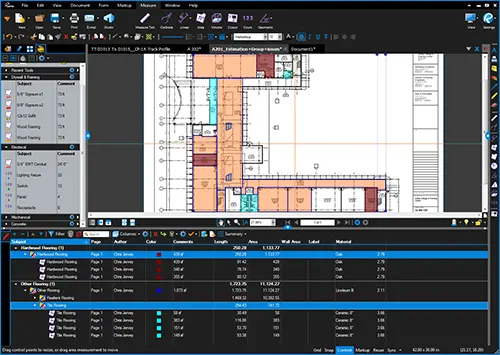
Use calibrated PDF measurement tools to calculate lengths, areas, quantities and other construction measurements directly from drawings.
Reusable tools, custom columns, Dynamic Fill and Quantity Link can further accelerate estimating and quantity takeoff workflows depending on the selected subscription.
Standardise Project Workflows
Create reusable Tool Sets, markup standards, measurement tools, statuses and workflows that can be shared across projects and teams.
Standardisation helps improve consistency while reducing repetitive setup work.
Identify Drawing Changes
Compare drawing revisions and overlay different versions to identify changes more efficiently.
This can reduce the time required to manually inspect revised documentation and help project teams identify important changes earlier.
Improve Collaboration
Enable multiple stakeholders to participate in digital drawing reviews and access shared project information.
Bluebeam Studio helps architects, engineers, contractors, subcontractors and project teams collaborate on project documentation without relying entirely on email-based communication.
Connect Office and Field
Access Bluebeam workflows across Windows desktop, web browsers and mobile devices.
This allows drawings, markups and project information to move more efficiently between design teams, project offices and construction sites.
Reduce Repetitive Work
Advanced Bluebeam plans introduce increasingly powerful automation capabilities for document management, takeoffs, drawing comparison and project workflows.
Bluebeam Max extends this further with AI-powered drawing review, comparison and workflow automation.
AI with Bluebeam Max
Bluebeam Max combines the established Bluebeam workflow with AI and advanced automation technologies designed specifically for architecture, engineering and construction workflows.
Max includes everything available with Bluebeam Complete and introduces AI-assisted drawing reviews, drawing comparisons, markup automation, multi-view Stitching and integration with external AI tools through Model Context Protocol (MCP).
Talk to Your Drawings with AI
Bluebeam Max can connect Revu to compatible AI tools through MCP.
This allows users to use natural-language prompts to interact with project information, search for information, create and update markups, create custom columns and extract insights from markup metadata.
Rather than navigating every workflow manually, users can use AI as another way to interact with Bluebeam and project data.
Smart Review
Smart Review uses AI to analyse construction documentation and identify potential drawing issues.
It can check for issues such as:
- Missing sheets
- Missing door tags
- Missing plumbing fixture tags
- Gridline inconsistencies
- Drawing discrepancies
Results can be presented through AI-generated markups, dashboards and trackable issues, helping project teams identify potential problems earlier in the review process.
Smart Overlay
Smart Overlay brings AI to drawing comparison.
Rather than simply overlaying two individual drawings, Smart Overlay can analyse sheet sets and help identify design changes and discrepancies across disciplines and drawing scales.
This can provide project teams with more useful information when reviewing coordinated architectural, structural and building services documentation.
Multi-View Stitching
Stitching automatically combines drawing sheets from different parts of a project into a continuous navigable view.
This can make it easier to understand relationships between drawings and gain a broader view of complex project documentation without manually assembling sheets.
Magic Markups
Magic Markups introduces CAD-like automation for existing Bluebeam markups.
Users can:
- Duplicate a markup as another markup type
- Convert an existing markup to another type
- Offset markups by a specified distance
Connected Studio Sessions with Revit
Bluebeam Max strengthens the connection between PDF review and BIM through Connected Studio Sessions with Revit.
Bluebeam markups can link to the corresponding location within Revit, including the relevant drawing sheet and 3D view.
Industries Using Bluebeam
Bluebeam is designed for professionals working across architecture, engineering, construction and infrastructure projects where accurate drawings, documentation and communication are critical.
Architecture
Architects can use Bluebeam for:
- Design reviews
- Drawing markups
- Consultant coordination
- Drawing comparison
- QA reviews
- Document management
- Studio collaboration
- Design issue tracking
Engineering
Engineering teams can use Bluebeam to review technical drawings, perform measurements, communicate design changes and coordinate information between engineering disciplines.
Applications include:
- Structural engineering
- Civil engineering
- Mechanical engineering
- Electrical engineering
- Hydraulic engineering
- Building services
- Multidisciplinary engineering
Construction
General contractors can use Bluebeam throughout preconstruction, construction and handover.
Common workflows include:
- Tender reviews
- Quantity takeoffs
- Drawing reviews
- RFIs
- Submittals
- Site logistics
- Defect inspections
- Drawing revisions
- Project handover
Estimating and Quantity Surveying
Estimators and quantity surveyors can perform calibrated measurements and quantity takeoffs directly from PDF drawings.
Advanced functionality available in Complete and Max includes Dynamic Fill, Quantity Link with Microsoft Excel and advanced reporting tools.
Subcontractors
Trade contractors can use Bluebeam to perform takeoffs, review documentation, create markups and communicate information between office and site teams.
Bluebeam is particularly useful where contractors need to work directly with construction drawings without access to the original CAD or BIM authoring software.
MEP and Building Services
Mechanical, electrical, plumbing and building services teams can use Bluebeam for:
- Drawing coordination
- Measurements
- Equipment counts
- Design reviews
- Drawing markups
- Construction coordination
- Site documentation
Infrastructure
Bluebeam can support infrastructure teams working across transport, civil infrastructure, utilities and major projects through drawing management, digital markups, document reviews and real-time collaboration.
Energy
Engineering, procurement and construction teams can use Bluebeam to manage technical documentation, reviews, markups and project communication across complex energy projects.
Mining
Mining organisations can use Bluebeam for volume measurements, drawing review, document management and project collaboration.
Government and Public Sector
Government agencies and public sector project teams can use Bluebeam for digital plan reviews, approvals, document management and collaboration.
Bluebeam can support infrastructure and transportation authorities, government contractors and federal, state and local agencies.
Compare Bluebeam Versions
All four Bluebeam plans include Bluebeam Revu for Windows desktop, Bluebeam on web and mobile, technical support, Bluebeam University and unlimited secure centralised storage.
Choose the subscription based on the level of measurement, collaboration, automation and AI functionality required by each user.
| Feature | Basics | Core | Complete | Max |
|---|---|---|---|---|
| Bluebeam Revu for Windows | ✓ | ✓ | ✓ | ✓ |
| Bluebeam web and mobile | ✓ | ✓ | ✓ | ✓ |
| PDF creation, viewing and editing | ✓ | ✓ | ✓ | ✓ |
| PDF markups and annotations | ✓ | ✓ | ✓ | ✓ |
| Markups List | ✓ | ✓ | ✓ | ✓ |
| Tool Chest | ✓ | ✓ | ✓ | ✓ |
| Length measurements | ✓ | ✓ | ✓ | ✓ |
| Area measurements | ✓ | ✓ | ✓ | ✓ |
| Perimeter measurements | — | ✓ | ✓ | ✓ |
| Count measurements | — | ✓ | ✓ | ✓ |
| Angle measurements | — | ✓ | ✓ | ✓ |
| Volume measurements | — | ✓ | ✓ | ✓ |
| Advanced 2D/3D markup tools | — | ✓ | ✓ | ✓ |
| Overlay drawings | — | ✓ | ✓ | ✓ |
| Batch Compare | — | ✓ | ✓ | ✓ |
| Auto-Align Overlay & Compare | — | ✓ | ✓ | ✓ |
| Create and host Studio Projects | — | ✓ | ✓ | ✓ |
| Create and host Studio Sessions | — | ✓ | ✓ | ✓ |
| Participate in Studio collaborations | ✓ | ✓ | ✓ | ✓ |
| CAD plug-ins and workflows | — | ✓ | ✓ | ✓ |
| Custom column formulas | — | ✓ | ✓ | ✓ |
| Dynamic Fill | — | — | ✓ | ✓ |
| Quantity Link with Microsoft Excel | — | — | ✓ | ✓ |
| Advanced markup reporting | — | — | ✓ | ✓ |
| Batch Link | — | — | ✓ | ✓ |
| Batch Slip Sheet | — | — | ✓ | ✓ |
| Batch signatures and seals | — | — | ✓ | ✓ |
| Scripting commands | — | — | ✓ | ✓ |
| AI integration via MCP | — | — | — | ✓ |
| Smart Review – AI drawing checks | — | — | — | ✓ |
| Smart Overlay – AI drawing comparison | — | — | — | ✓ |
| Multi-view Stitching | — | — | — | ✓ |
| Magic Markups – Duplicate As | — | — | — | ✓ |
| Magic Markups – Convert To | — | — | — | ✓ |
| Magic Markups – Offset | — | — | — | ✓ |
| Connected Studio Sessions with Revit | — | — | — | ✓ |
Which Bluebeam Plan Should You Choose?
Bluebeam Basics
Best suited to users who primarily need PDF viewing, editing, markups, document management and basic measurements.
Choose Basics when users need to review and mark up project drawings and participate in existing Studio collaborations but do not require advanced measurements, takeoffs or the ability to create and manage Studio collaborations.
Bluebeam Core
Best suited to architects, engineers, project managers, construction professionals and technical users who require professional drawing review, measurements and collaboration.
Core adds advanced measurements, drawing overlays, batch comparison, CAD workflows and the ability to initiate and manage Studio collaborations.
Bluebeam Complete
Best suited to estimators, quantity surveyors, contractors and advanced Bluebeam users who want to automate repetitive processes and perform sophisticated takeoffs.
Complete adds Dynamic Fill, Quantity Link with Microsoft Excel, advanced reporting, Batch Link, Batch Slip Sheet, batch signatures and seals and scripting capabilities.
Bluebeam Max
Best suited to organisations and advanced users wanting Bluebeam's most powerful workflows, including AI, advanced automation and closer PDF-to-BIM coordination.
Max includes everything in Complete and adds AI integration via MCP, Smart Review, Smart Overlay, multi-view Stitching, Magic Markups and Connected Studio Sessions with Revit.
For organisations with different user requirements, Bluebeam allows Basics, Core, Complete and Max subscriptions to be mixed and matched across users.
Complimentary Software and Services for Autodesk Software
Bluebeam provides scalable solutions that grow with your organization. Whether you need basic PDF functionality or enterprise-grade document management and automation, there is an edition designed to optimize your specific workflows and project requirements.
Why Choose Design Consulting | Autodesk Gold Partner | Autodesk Service Provider
Design Consulting is a trusted Autodesk Gold Partner and Autodesk Service Provider. Design Consulting empowers architects, engineers, manufacturers, and builders with smart software, systems, automation, and digital tools that provide Autodesk end-to-end solutions that are connected with systems and machines. As an Autodesk Gold Partner, we deliver tailored solutions that simplify workflows, reduce costs, and drive better project outcomes.
About DC Autodesk Courses Services Configurators CRM/ERP Batch Imagery
Ready to Collaborate?
Speak with our team today to see how Bluebeam tools can help you manage your PDFs, collaborate and estimate with better Quantity Take-Offs.
Fill out the contact form below or contact us on 1800 490 514, info@designconsulting.com.au or by live chat